Manage your data like a spreadsheet
The Data Management module turns your database into a familiar, spreadsheet-style workspace— with advanced search, conditional styling, formulas, and granular record-level permissions.
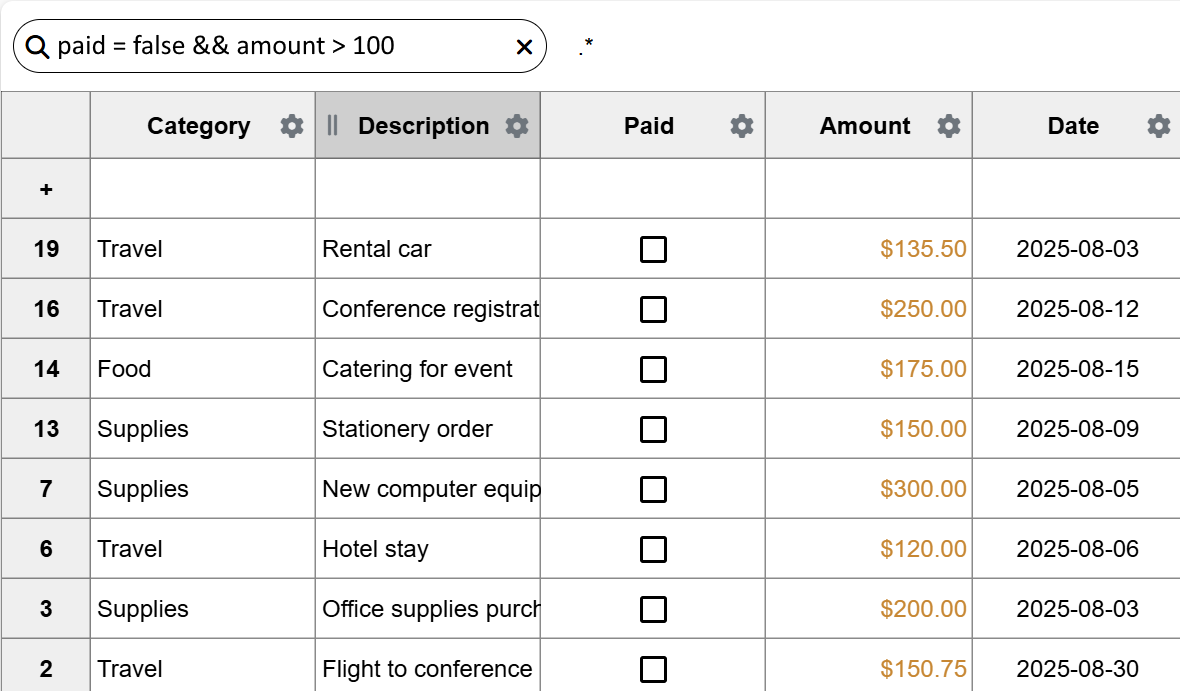
A single place to search, edit, and secure your data
Data Management combines the ease of a spreadsheet with the structure and safety of a database. Business teams get a familiar interface, while admins keep tight control over access, history, and schema.
- Advanced search with filters, saved views, and full‑text search
- Edit records inline like an Excel spreadsheet—no SQL needed
- Conditional styling to highlight risks, deadlines, or anomalies
- Calculated columns using Excel-style formulas or JavaScript
- Easy migrations with import/export to CSV, Excel & JSON
- Granular collection & record-level permissions
- Automatic metadata & history tracking for every change
Advanced search & views
Combine filters, full‑text search, sorting, and column selection into reusable views. Share views with teams or lock them to specific roles for consistent reporting.
Spreadsheet-like editing
Click, type, and bulk‑edit just like a spreadsheet, while Momentum handles validation, relationships, and permissions in the background.
Formulas & calculated fields
Use familiar Excel-style formulas or JavaScript expressions to derive metrics—from margins and SLAs to risk scores and health indicators.
Import & export at scale
Convert data to and from CSV, Excel, or JSON without writing scripts ensuring easy migrations and no vendor lock-in.
Granular permissions
Control access at the collection, view, and record level. Combine with Authentication for group‑based access and auditability on every change.
Metadata & history
Track who changed what and when, with automatic metadata on records. Integrates with Audit Logs so you can review and revert critical modifications.
The backbone of records across modules
Data Management sits at the center of Momentum, powering Forms, Analytics, AI workflows, Actions, and more—so your records stay consistent everywhere.
Forms & reports
Use Data collections as the source of truth for dynamic forms and business reports. Every submission and update flows back into a consistent schema.
- Drive dashboards from the same tables users edit
- Build filtered reports without duplicating data
- Keep forms, storage, and records in sync
Analytics & AI
Data Management provides structured tables that Analytics and the AI Assistant can query, enrich, and summarize without manual exports.
- Use AI to ask questions about your records
- Create calculated KPIs for Analytics dashboards
- Automatically clean & enrich imported datasets
Actions & automation
Combine Data Management with Actions to automate imports, validations, and downstream workflows.
- Process uploaded spreadsheets into clean records
- Trigger workflows when key fields change
- Generate alerts for anomalies or missing data
How teams use Data Management day to day
Common ways customers replace scattered spreadsheets with a single, controlled source of truth.
Operations & inventory
Track SKUs, stock levels, suppliers, and orders in one place—without giving up the speed and familiarity of a spreadsheet.
- Conditional styling for low‑stock alerts
- Automatic reorder quantities and lead‑time formulas
- Permissions for warehouse vs. finance vs. vendors
CRM & account tracking
Replace ad‑hoc customer spreadsheets with structured, permissioned records that still feel edit‑friendly to sales and support teams.
- Views for pipelines, renewals, and churn risk
- Formulas for health scores and next‑step dates
- History on every touchpoint and ownership change
Finance & reporting
Standardize budgets, invoices, and actuals in structured tables that feed downstream reporting and automation.
- Import CSVs from banks and accounting tools
- Use formulas for margins, taxes, and accruals
- Export clean datasets for BI or audits
Bring every spreadsheet into a secure, auditable system
Use Momentum’s Data Management module to centralize records, keep formulas and styling your teams love, and layer on permissions, history, and automation—all in one platform.
Start your free trial →